01-AWS Cloud Service Architecture - approved
The objective of this architecture is to provide an email service tailored for authentication scenarios (e.g., sending OTPs, "magic links", and login validations) without the need to manage on-premises servers. It leverages a serverless model with managed resources in the us-east-1 (N. Virginia) region, ensuring scalability, security, and compliance.
As illustrated in Figure 1, the solution supports the definition of email templates, processes sending events asynchronously, and automatically manages retries and error handling. By adopting event-driven processing, asynchronous queuing, and scalable delivery mechanisms, the architecture minimizes operational overhead while enabling the team to focus on business logic and service optimization.
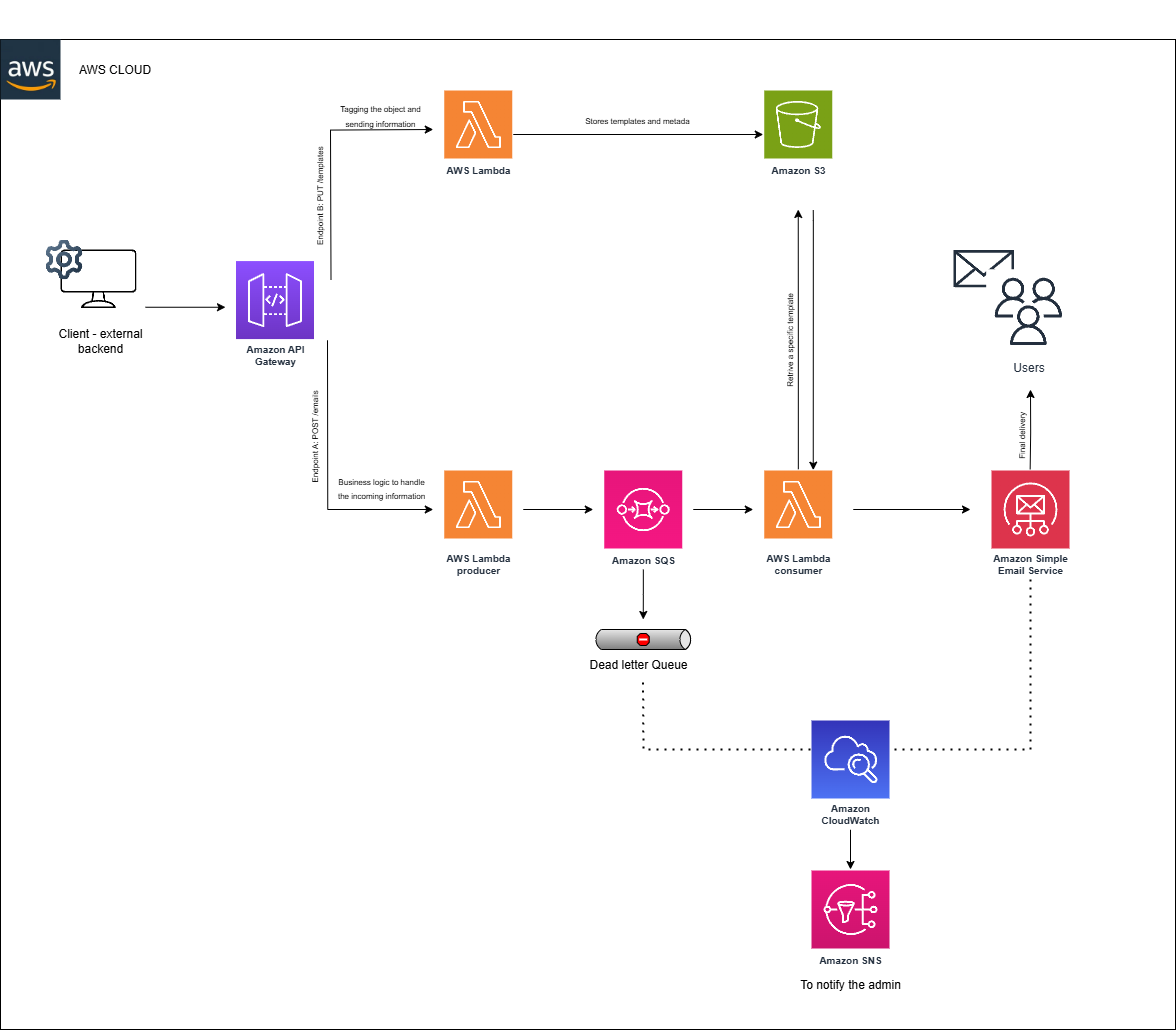 Figure 1. Reference architecture for delivery solution on AWS (integrating API Gateway, Lambda, S3, SQS/DLQ, SES, CloudWatch, and SNS). In case you want to modify, click here .
Components of the flow and technical justification
Amazon API Gateway
- Acts as an HTTP(S) "gateway" to expose endpoints for template management and email sending.
- Upon receiving a
PUT /templatesorPOST /emails, it invokes Lambda functions with the corresponding data. - Concepts
Detailed Configuration
- Endpoint Setup: Configure REST API with stages (e.g.,
stage) and enable CORS for external client access. - Authentication: Implement an AWS IAM authorizer for secure endpoint access.
- Throttling: Set rate limits (e.g., 1,000 requests per second) to prevent abuse, adjustable via usage plans.
AWS Lambda
- Within the proposed serverless architecture, each AWS Lambda function is designed with a specific purpose:
- Template Manager Lambda: Manages email templates and metadata (e.g., subject, dynamic fields, branding). It also tags and uploads templates to S3 via
PUT /templates. - Message Producer Lambda: Generates and publishes authentication events (e.g., login attempts, OTP requests, magic link generation) into Amazon SQS. This decouples the request flow from email processing and ensures durability.
- Message Consumer Lambda: Subscribes to the queue, retrieves messages, and interacts with Amazon SES to send the corresponding email. It includes retry logic, error handling, and forwarding failed attempts to the DLQ for further inspection.
- Template Manager Lambda: Manages email templates and metadata (e.g., subject, dynamic fields, branding). It also tags and uploads templates to S3 via
- Concepts
Detailed Configuration
- Execution Role: Assign minimal IAM roles:
s3:GetObjectfor the templates bucket,sqs:SendMessagefor the producer, andses:SendEmailfor the consumer. - Timeout: Configure a 10-second timeout for producer/consumer, ensuring it’s less than the SQS Visibility Timeout (e.g., 30 seconds).
- Idempotency: Use message IDs or unique keys to track processed requests, preventing duplicate emails on retries.
- Concurrency: Set reserved concurrency (e.g., 50) to manage peak loads and avoid throttling.
- Environment Variables: Store S3 bucket names, SQS queue URLs, and SES region in environment variables for dynamic configuration.
- Caching: consider to implementing simple in-memory caching (e.g., static variable) for frequently accessed S3 templates to reduce latency.
Amazon S3
- Stores email templates (HTML, text, etc.) in secure buckets.
- S3 offers high durability and scalability, ideal for static objects.
- Each template can be versioned and cataloged; metadata and/or tags (e.g., name, email type, date, version, environment) are associated, with S3 allowing up to 10 tags per object.
- For security, S3 Block Public Access is enabled, and default SSE encryption is applied, preventing accidental exposure of confidential templates.
- Concepts
Detailed Configuration
- Bucket Policy: Restrict access to specific IAM roles (e.g., Lambda) using a bucket policy with
s3:GetObjectands3:PutObjectpermissions. - Versioning: Enable versioning to track template changes and enable rollbacks if needed.
- Tagging: Apply tags (e.g.,
Environment=prod,Type=template), according to the tag manual in the company for lifecycle policies and cost allocation. - Encryption: Use SSE-S3 with AES-256 as the default encryption, ensuring data at rest is protected.
Amazon SQS and Dead-Letter Queue
- SQS is a managed message queue that decouples distributed components Concepts.
- A standard queue is used to enqueue send requests, freeing the producer from waits and enabling high monthly volumes.
- SQS ensures durability (storing messages on redundant servers) and availability, processing messages at least once. Note that standard queues may result in occasional message duplication due to at-least-once delivery, though this can be mitigated with idempotent Lambda logic; this trade-off is generally more cost-effective compared to FIFO queues, which guarantee exact-once delivery at a higher price point.
- A Redrive Policy is configured, where after a maximum number of failed attempts (e.g., 3), the message automatically moves to the Dead-Letter Queue (DLQ) for later analysis.
- AWS recommends using the
maxReceiveCountparameter in the source queue to control this transition. - SSE encryption (SSE-SQS with AWS KMS) is enabled to protect messages at rest.
- For monitoring, a CloudWatch alarm is created on the
ApproximateNumberOfMessagesVisiblemetric of the DLQ (threshold ≥1), linked to an SNS topic sending email or SMS to the administrator in case of persistent errors.
Detailed Configuration
- Queue Type: Use a standard queue with a 30-second Visibility Timeout to match Lambda processing time.
- Redrive Policy: Set
maxReceiveCountto 3 and link to a DLQ with a 3-day retention period. - Message Size: Limit messages to 256 KB to optimize performance and cost.
- Encryption: Enable SSE-SQS with for enhanced security.
- Dead Letter Queue: Configure DLQ with a separate CloudWatch alarm for visibility (threshold ≥5 messages).
All configuration values outlined above are subject to change based on evolving workload patterns, operational requirements, and security best practices
Amazon Simple Email Service (SES)
- SES is AWS's managed email service, handling delivery, scaling, and email reputation automatically.
- Processed emails are sent via its API from Lambda.
- SES requires domain verification before sending: a domain identity is configured, involving publishing SPF and DKIM DNS records.
- For a custom domain, an SPF record must be published in DNS to authorize the AWS server, optionally with an MX record for bounces.
- It is recommended to add a
_dmarcTXT record in DNS to enable DMARC, validating SPF/DKIM alignment per the defined policy. - Monitoring bounce/complaint rates is critical, as exceeding thresholds may lead AWS to suspend sending.
- Alarms (e.g., on bounce rate) will be configured to notify the support team via SNS.
- Concepts
Detailed Configuration
- Domain Verification: Verify a custom domain with Easy DKIM, adding CNAME records to DNS and awaiting SES confirmation.
- Sending Limits: Request a sending quota increase (e.g., 200 emails/second).
- Feedback Notifications: Configure SNS topics for bounce, complaint, and delivery notifications.
- MAIL FROM Domain: Set a custom MAIL FROM domain with an SPF record and optional MX record for bounces.
- DMARC: Implement a
_dmarcTXT record with a policy (e.g.,p=quarantine) and monitor alignment reports.
Amazon CloudWatch and SNS
- CloudWatch centralizes logs and metrics from services.
- Standard metrics from SQS and SES are captured.
- Based on these metrics, alarms are defined: e.g., number of messages in DLQ and SES bounce rate.
- For the DLQ and general notifications, a CloudWatch Alarm is created on
ApproximateNumberOfMessagesVisiblethat, when exceeding 0, publishes a message to an SNS topic. - SNS distributes the alert to the administrator (via email/SMS).
- SNS also enables other notifications (e.g., new CloudWatch events of interest).
- According to AWS, using SNS for critical CloudWatch alarms is a standard practice.
- Additionally, SNS provides a pub/sub layer for potential future extensions (e.g., fan-out of events to other systems).
- Concepts More Info
Detailed Configuration
- Metric Collection: Enable detailed monitoring for SQS and SES, capturing metrics every 1 minute.
- Alarm Setup: Create an alarm on
ApproximateNumberOfMessagesVisiblewith a 5-minute period and threshold of 1. - SNS Topic: Configure an SNS topic with an email subscription for the administrator, enabling email confirmation.
- Log Retention: Set CloudWatch Logs retention to 30 days for cost efficiency.
- Notification Frequency: Limit SNS notifications to avoid alert fatigue (e.g., 1 notification every 15 minutes).
Estimated Monthly Cost Analysis
Costs are estimated base on the following assumptions:
| Service Name | Monthly Cost (1,000) | Monthly Cost (10,000) | Config Summary |
|---|---|---|---|
| Amazon S3 | 0.05 USD | 0.05 USD | S3 Standard storage (1 GB/month), Data scanned/returned by S3 Select (1 GB), Data transfer inbound/outbound (1 GB) |
| Amazon SNS | 0.02 USD | 0.20 USD | Requests (1k/10k), HTTP/HTTPS notifications, Email/Email-JSON notifications, Data transfer inbound/outbound (1 GB) |
| Amazon SES | 0.22 USD | 1.12 USD | Email messages sent from email client (1k/10k), Open ingress endpoints |
| AWS Lambda | 0.00 USD | 0.00 USD | 3,000 (1k scenario) / 30,000 (10k scenario) requests, Ephemeral storage (512 MB), Architectures (Arm) |
| Amazon CloudWatch | 1.21 USD | 1.30 USD | GetMetricData (1k/10k requests), Number of metrics (4, includes detailed & custom metrics) |
| Amazon SQS | 0.52 USD | 0.62 USD | Standard queue requests (1M–1.5M/month), Fair queue requests, Data transfer inbound/outbound (1 GB), Transfer cost (0.02 USD) |
| Amazon API Gateway | 14.60 USD | 14.63 USD | REST API requests, Avg message size (32 KB), Cache size (0.5 GB) |
Notes
- Cost calculators (per scenario estimates):
These links show AWS cost estimates per scenario. If consumption changes, the calculators can be updated to reflect new configurations.
- SQS pricing model: Costs are based on 64 KB chunks, with each chunk counted as one request. Larger messages generate higher costs.
- Dynamic pricing: Any configuration change (e.g., Lambda memory allocation, request volume, API Gateway cache size) directly impacts costs. Updates can be modeled in real time using the AWS Pricing Calculator.